Complete Guide to AI Photo Enhancement: Best Tools and Techniques 2025
Artificial Intelligence has fundamentally transformed the landscape of digital photography and image processing. In 2025, AI photo enhancement tools have become so sophisticated that they can deliver professional-grade results that were once only achievable by expert photographers and digital artists with years of training and expensive software.
This comprehensive guide will walk you through everything you need to know about AI photo enhancement, from understanding the underlying technology to choosing the right tools for specific enhancement needs. Whether you're a professional photographer, content creator, or someone who simply wants to improve personal photos, this guide provides the knowledge and insights you need to leverage AI for stunning image enhancement results.
Table of Contents
1. Understanding AI Photo Enhancement Technology
2. Types of Photo Problems AI Can Solve
3. Comprehensive Tool Categories
4. Step-by-Step Enhancement Workflows
5. Advanced Techniques and Combinations
6. Professional Use Cases and Applications
7. Future Trends and Developments
Understanding AI Photo Enhancement Technology
The Science Behind AI Image Processing
AI photo enhancement relies on sophisticated machine learning models, primarily deep neural networks, that have been trained on millions of high-quality image pairs. These models learn to recognize patterns, textures, and structures in images, enabling them to make intelligent decisions about how to improve various aspects of photo quality.
Convolutional Neural Networks (CNNs): The backbone of most AI enhancement tools, CNNs are specifically designed to process visual data. They can identify features at different scales, from fine details like skin texture to broader elements like overall composition and lighting.
Generative Adversarial Networks (GANs): These advanced AI systems consist of two neural networks competing against each other - one generates enhanced images while the other evaluates their quality. This competition drives continuous improvement in enhancement quality.
Super-Resolution Algorithms: Specialized AI models that can intelligently increase image resolution by generating new pixel data based on learned patterns from high-resolution training images.
Training Data and Model Development
The effectiveness of AI enhancement tools depends heavily on the quality and diversity of their training data. Modern AI models are trained on:
- Paired Datasets: Millions of before/after image pairs showing various types of degradation and their corrections
- Synthetic Data: Computer-generated images with controlled degradation patterns
- Real-World Examples: Photos captured in various lighting conditions, with different camera settings, and showing natural aging or damage
Processing Architectures
Edge Computing: Modern AI tools can process images locally on your device, ensuring privacy and reducing processing time.
Cloud Processing: For complex enhancements requiring significant computational power, cloud-based AI offers superior capabilities.
Hybrid Approaches: The best tools combine local and cloud processing, using local processing for basic enhancements and cloud resources for advanced features.
Types of Photo Problems AI Can Solve
Technical Image Quality Issues
Motion Blur and Camera Shake: One of the most common photography problems, blur can result from camera movement during exposure or subject motion. AI algorithms can analyze blur patterns and reconstruct sharp details using advanced deconvolution techniques.
Out-of-Focus Images: When autofocus systems fail or manual focus is incorrect, AI can enhance edge definition and restore clarity to soft images.
Low Resolution and Pixelation: AI upscaling can transform low-resolution images into high-definition versions, generating new detail that maintains the original image's character.
Noise and Grain: High ISO photography and poor lighting conditions create unwanted noise. AI can distinguish between noise and actual image content, removing artifacts while preserving important details.
Color and Exposure Problems
White Balance Issues: Incorrect color temperature settings can make images appear too warm or cool. AI color correction can analyze skin tones and known color references to restore natural color balance.
Over/Under Exposure: AI can recover detail from shadows and highlights, expanding the dynamic range of images that seemed beyond repair.
Color Fading and Shifts: Particularly common in older photographs, chemical degradation can cause significant color changes. AI can estimate original colors based on remaining color information and historical color palettes.
Age-Related Degradation
Physical Damage: Tears, scratches, stains, and missing portions can be intelligently reconstructed using surrounding image context.
Chemical Deterioration: Fading, color shifts, and chemical staining can be reversed using AI models trained specifically on aged photograph restoration.
Digital Compression Artifacts: JPEG compression and other digital artifacts can be reduced while enhancing overall image quality.
Comprehensive Tool Categories and Applications
Image Sharpening and Blur Correction
The AI Photo Unblur Tool represents one of the most significant advances in computational photography. These tools can:
Analyze Blur Types: Different types of blur require different correction approaches. AI can identify whether blur is caused by motion, focus issues, or optical problems.
Reconstruct Missing Detail: Advanced algorithms can generate realistic detail in blurred areas based on learned patterns from similar images.
Preserve Natural Appearance: Unlike traditional sharpening filters that can create artificial-looking results, AI enhancement maintains natural image characteristics.
Batch Processing: Professional workflows benefit from AI tools that can process multiple images with consistent quality.
Best Practices for Blur Correction
1. Start with the highest quality original available
2. Identify the type of blur before choosing enhancement settings
3. Process in stages for severely blurred images
4. Combine with noise reduction if the original image has grain
5. Adjust enhancement strength based on intended use
Photo Restoration and Repair
Old Photo Restoration using AI has revolutionized how we preserve family memories and historical images. Modern AI restoration can:
Reconstruct Missing Areas: When parts of a photo are completely missing or severely damaged, AI can intelligently fill these gaps using context from surrounding areas.
Remove Age-Related Damage: Scratches, stains, tears, and other physical damage can be automatically detected and repaired.
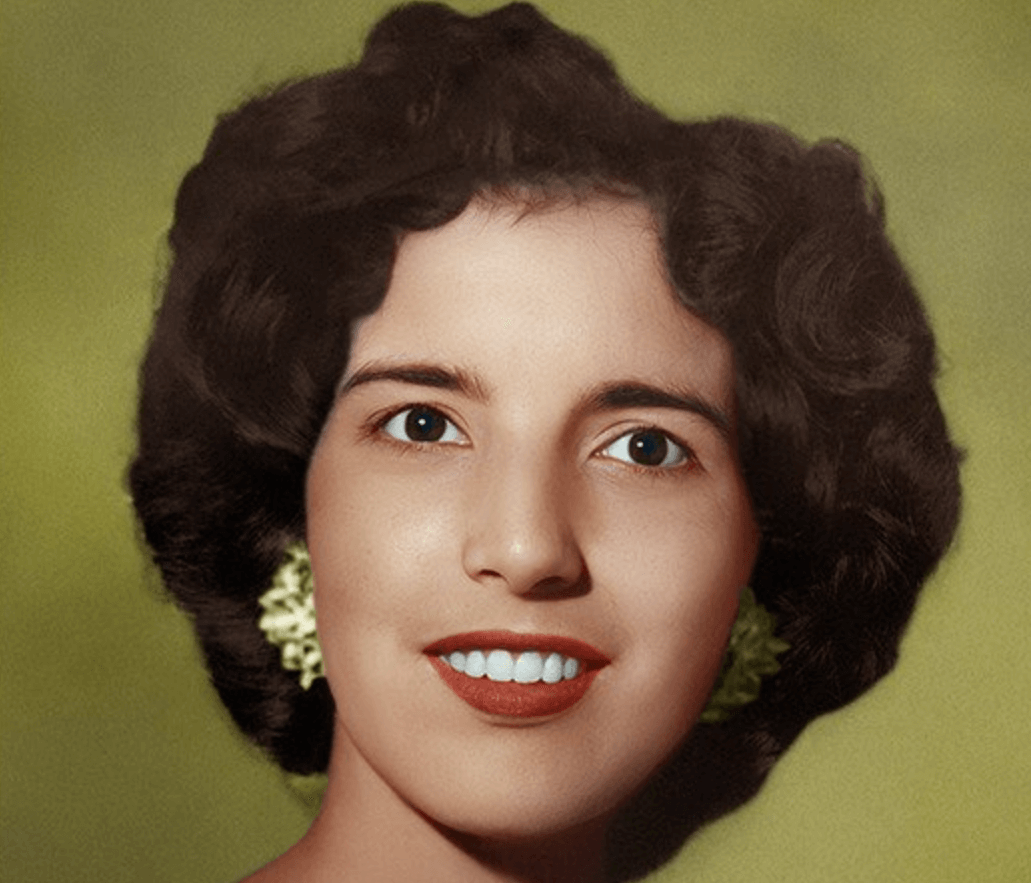
Restore Original Colors: Faded or shifted colors can be corrected using AI models trained on historical color palettes and aging patterns.
Enhance Overall Quality: Beyond repair, AI can improve the general quality of old photos, making them suitable for modern display and printing.
Restoration Workflow Best Practices
1. High-Quality Scanning: Start with the best possible digital version
2. Damage Assessment: Identify all types of damage before processing
3. Sequential Processing: Address different issues in logical order
4. Quality Verification: Compare results with historical context
5. Archival Storage: Preserve both original and enhanced versions
Portrait and Face Enhancement
The AI Face Enhancer tools have become incredibly sophisticated, offering natural-looking improvements that enhance rather than artificially alter facial features:
Skin Enhancement: Improve skin texture and tone while maintaining natural appearance and individual characteristics.
Eye Enhancement: Brighten and sharpen eyes, enhance iris detail, and improve overall eye clarity without creating an artificial look.
Facial Feature Definition: Enhance the definition of lips, eyebrows, and facial contours while preserving natural proportions.
Lighting Optimization: Correct uneven lighting, reduce harsh shadows, and create more flattering illumination.
Age-Appropriate Processing: Apply different enhancement strategies based on the subject's age and facial characteristics.
Ethical Considerations in Portrait Enhancement
- Maintain Natural Appearance: Avoid over-processing that creates unrealistic results
- Respect Individual Characteristics: Preserve unique facial features and characteristics
- Consent and Transparency: Ensure subjects consent to enhancement, especially for public use
- Cultural Sensitivity: Respect diverse beauty standards and facial characteristics
Resolution Enhancement and Upscaling
AI Image Upscaling has progressed far beyond simple interpolation, now capable of generating realistic detail at higher resolutions:
Super-Resolution Technology: Generate new visual information that wasn't present in the original low-resolution image.
Content-Aware Processing: Apply different enhancement strategies to different types of content (faces, landscapes, text, graphics).
Edge Preservation: Maintain sharp edges and fine details during the upscaling process.
Artifact Prevention: Avoid common upscaling artifacts like ringing, jaggedness, and unnatural textures.
Upscaling Applications
- Print Preparation: Enlarge images for large-format printing
- Digital Display: Optimize for high-resolution monitors and displays
- Archive Enhancement: Improve historical image collections
- Content Creation: Prepare assets for modern media production
Color Correction and Enhancement
AI Color Correction tools have become essential for both corrective and creative color work:
Automatic White Balance: Correct color temperature and tint issues using AI analysis of skin tones and known color references.
Selective Color Correction: Target specific color ranges for adjustment without affecting the entire image.
Memory Color Enhancement: Optimize colors that humans have strong memory associations with (skin, sky, grass).
Creative Color Grading: Apply sophisticated color treatments for artistic and commercial applications.
Color Theory in AI Enhancement
Understanding color relationships helps optimize AI enhancement results:
- Color Harmony: AI considers pleasing color combinations
- Emotional Impact: Colors evoke specific emotional responses
- Cultural Context: Different cultures have varying color preferences
- Technical Accuracy: Maintaining color accuracy for commercial applications
Background and Composition Enhancement
Background Enhancement tools focus on improving overall image composition:
Background Blur and Focus: Create professional depth-of-field effects
Object Removal: Eliminate distracting elements from backgrounds
Lighting Unification: Balance lighting between subject and background
Composition Optimization: Enhance overall visual flow and balance
Quality Enhancement for Degraded Images
Low Quality Enhancement addresses images with multiple quality issues:
Compression Artifact Removal: Eliminate JPEG artifacts and other compression damage
Pixelation Correction: Transform blocky, pixelated images into smooth, detailed versions
Multi-Issue Processing: Handle images with combinations of quality problems
Format Optimization: Prepare images for specific output requirements
Noise Reduction and Grain Management
AI Photo Denoiser tools intelligently separate noise from image content:
Luminance Noise Reduction: Remove brightness variations while preserving detail
Color Noise Elimination: Eliminate color speckles and shifts
Grain Pattern Recognition: Distinguish between film grain and digital noise
Detail Preservation: Maintain fine textures and important image details
Video Enhancement Capabilities
Video Enhancement extends AI capabilities to moving images:
Temporal Consistency: Maintain smooth, flicker-free enhancement across frames
Motion Analysis: Understand movement patterns for better enhancement decisions
Real-Time Processing: Enable live video enhancement applications
Batch Video Processing: Handle large video files efficiently
Advanced Enhancement Workflows and Techniques
Multi-Tool Enhancement Strategies
Professional enhancement often requires combining multiple AI tools for optimal results:
Sequential Processing: Apply tools in logical order for cumulative improvement
Selective Enhancement: Use different tools on different areas of the same image
Quality Assessment: Evaluate results at each stage of the enhancement process
Optimization for Output: Tailor enhancement for specific display or print requirements
Professional Workflow Integration
Batch Processing: Handle large image collections efficiently
Quality Control: Implement consistent standards across projects
Client Communication: Present enhancement options and results effectively
Archive Management: Organize original and enhanced versions systematically
Creative Applications
Beyond corrective enhancement, AI tools enable creative possibilities:
Artistic Style Transfer: Apply painting or artistic styles to photographs
Era Simulation: Make modern photos appear vintage or historical
Mood Enhancement: Adjust images to convey specific emotions or atmospheres
Commercial Applications: Prepare images for advertising and marketing use
Industry Applications and Use Cases
Professional Photography
Wedding Photography: Enhance portraits and fix lighting issues in challenging conditions
Real Estate: Improve property photos for better marketing appeal
Product Photography: Ensure accurate colors and sharp details for e-commerce
Event Photography: Correct issues from varied lighting and shooting conditions
Media and Entertainment
Film and Television: Enhance footage for broadcast quality
Gaming Industry: Improve textures and visual assets
Advertising: Create compelling visual content for campaigns
Social Media: Optimize content for various platforms and audiences
Historical Preservation
Museum Collections: Restore and preserve historical photographs
Family Heritage: Help families preserve precious memories
Documentary Production: Enhance historical footage and photographs
Academic Research: Improve visual materials for scholarly work
E-commerce and Business
Product Catalogs: Ensure consistent, high-quality product images
Brand Photography: Maintain visual consistency across marketing materials
Corporate Communications: Enhance photos for annual reports and presentations
Real Estate Marketing: Improve property photos for better sales results
Technical Considerations and Best Practices
Hardware Requirements
Processing Power: Understanding CPU vs. GPU processing for different tools
Memory Requirements: RAM and storage considerations for large image files
Display Quality: Color-accurate monitors for proper evaluation of results
Input Devices: High-quality scanners and cameras for best source material
File Format Considerations
RAW Processing: Working with uncompressed camera files for maximum quality
Format Preservation: Maintaining image quality through the enhancement process
Output Optimization: Choosing appropriate formats for different uses
Metadata Management: Preserving important image information
Quality Assessment
Objective Metrics: Technical measurements of image quality improvement
Subjective Evaluation: Human assessment of enhancement quality
Comparative Analysis: Before/after evaluation techniques
Long-term Stability: Ensuring enhanced images maintain quality over time
Future Trends and Developments in AI Photo Enhancement
Emerging Technologies
Neural Architecture Advances: New AI model designs offering better performance
Real-Time Processing: Instant enhancement capabilities for live applications
Mobile Integration: Bringing professional-quality tools to smartphones
Augmented Reality: Enhancing images in real-time viewing applications
Industry Evolution
Accessibility Improvements: Making professional tools available to everyone
Cloud Computing Integration: Leveraging distributed processing power
Automation Advances: Reducing manual intervention in enhancement workflows
Quality Standardization: Developing industry standards for AI enhancement
Ethical and Social Considerations
Authenticity Concerns: Balancing enhancement with truthful representation
Cultural Sensitivity: Respecting diverse beauty standards and values
Privacy Protection: Ensuring personal data security in cloud processing
Professional Standards: Developing guidelines for ethical enhancement practices
Choosing the Right AI Enhancement Tools
Evaluation Criteria
Quality Assessment: How to evaluate enhancement quality objectively
Feature Comparison: Understanding different tool capabilities
Workflow Integration: Compatibility with existing processes
Cost Considerations: Balancing features with budget requirements
Tool Recommendations by Use Case
Beginner Users: Simple, automated tools for casual enhancement
Professional Photographers: Advanced tools with fine control options
Restoration Specialists: Specialized tools for historical image work
Commercial Applications: Tools optimized for business and marketing needs
Getting Started with AI Photo Enhancement
Building Enhancement Skills
Learning Resources: Tutorials, courses, and educational materials
Practice Projects: Exercises for developing enhancement expertise
Community Engagement: Connecting with other enhancement professionals
Continuous Learning: Staying updated with new technologies and techniques
Setting Up Your Enhancement Workflow
Tool Selection: Choosing the right combination of AI tools
Process Development: Creating efficient enhancement workflows
Quality Control: Implementing standards and review processes
Result Documentation: Tracking improvements and learning from results
Conclusion
AI photo enhancement represents one of the most significant technological advances in digital imaging history. The tools and techniques available in 2025 offer unprecedented capabilities for improving, restoring, and transforming photographs of all types.
Whether you're dealing with blurry smartphone photos, faded family memories, or professional imaging challenges, AI enhancement tools like RestoreAI's comprehensive suite provide accessible, powerful solutions. The key to success lies in understanding each tool's strengths, learning proper workflows, and applying enhancement techniques thoughtfully and ethically.
As AI technology continues to evolve, we can expect even more impressive capabilities, but the fundamental principles covered in this guide will remain relevant. Start with the basics, experiment with different tools and techniques, and gradually build your expertise in this exciting and rapidly advancing field.
The future of photography enhancement is here, and it's powered by artificial intelligence. Explore RestoreAI's complete collection of AI enhancement tools and discover how these revolutionary technologies can transform your images and workflows.
Ready to get started? Try RestoreAI's AI Photo Enhancement Tools today and experience the power of artificial intelligence for yourself.
Artificial Intelligence has fundamentally transformed the landscape of digital photography and image processing. In 2025, AI photo enhancement tools have become so sophisticated that they can deliver professional-grade results that were once only achievable by expert photographers and digital artists with years of training and expensive software.
This comprehensive guide will walk you through everything you need to know about AI photo enhancement, from understanding the underlying technology to choosing the right tools for specific enhancement needs. Whether you're a professional photographer, content creator, or someone who simply wants to improve personal photos, this guide provides the knowledge and insights you need to leverage AI for stunning image enhancement results.
Table of Contents
1. Understanding AI Photo Enhancement Technology
2. Types of Photo Problems AI Can Solve
3. Comprehensive Tool Categories
4. Step-by-Step Enhancement Workflows
5. Advanced Techniques and Combinations
6. Professional Use Cases and Applications
7. Future Trends and Developments
Understanding AI Photo Enhancement Technology
The Science Behind AI Image Processing
AI photo enhancement relies on sophisticated machine learning models, primarily deep neural networks, that have been trained on millions of high-quality image pairs. These models learn to recognize patterns, textures, and structures in images, enabling them to make intelligent decisions about how to improve various aspects of photo quality.
Convolutional Neural Networks (CNNs): The backbone of most AI enhancement tools, CNNs are specifically designed to process visual data. They can identify features at different scales, from fine details like skin texture to broader elements like overall composition and lighting.
Generative Adversarial Networks (GANs): These advanced AI systems consist of two neural networks competing against each other - one generates enhanced images while the other evaluates their quality. This competition drives continuous improvement in enhancement quality.
Super-Resolution Algorithms: Specialized AI models that can intelligently increase image resolution by generating new pixel data based on learned patterns from high-resolution training images.
Training Data and Model Development
The effectiveness of AI enhancement tools depends heavily on the quality and diversity of their training data. Modern AI models are trained on:
- Paired Datasets: Millions of before/after image pairs showing various types of degradation and their corrections
- Synthetic Data: Computer-generated images with controlled degradation patterns
- Real-World Examples: Photos captured in various lighting conditions, with different camera settings, and showing natural aging or damage
Processing Architectures
Edge Computing: Modern AI tools can process images locally on your device, ensuring privacy and reducing processing time.
Cloud Processing: For complex enhancements requiring significant computational power, cloud-based AI offers superior capabilities.
Hybrid Approaches: The best tools combine local and cloud processing, using local processing for basic enhancements and cloud resources for advanced features.
Types of Photo Problems AI Can Solve
Technical Image Quality Issues
Motion Blur and Camera Shake: One of the most common photography problems, blur can result from camera movement during exposure or subject motion. AI algorithms can analyze blur patterns and reconstruct sharp details using advanced deconvolution techniques.
Out-of-Focus Images: When autofocus systems fail or manual focus is incorrect, AI can enhance edge definition and restore clarity to soft images.
Low Resolution and Pixelation: AI upscaling can transform low-resolution images into high-definition versions, generating new detail that maintains the original image's character.
Noise and Grain: High ISO photography and poor lighting conditions create unwanted noise. AI can distinguish between noise and actual image content, removing artifacts while preserving important details.
Color and Exposure Problems
White Balance Issues: Incorrect color temperature settings can make images appear too warm or cool. AI color correction can analyze skin tones and known color references to restore natural color balance.
Over/Under Exposure: AI can recover detail from shadows and highlights, expanding the dynamic range of images that seemed beyond repair.
Color Fading and Shifts: Particularly common in older photographs, chemical degradation can cause significant color changes. AI can estimate original colors based on remaining color information and historical color palettes.
Age-Related Degradation
Physical Damage: Tears, scratches, stains, and missing portions can be intelligently reconstructed using surrounding image context.
Chemical Deterioration: Fading, color shifts, and chemical staining can be reversed using AI models trained specifically on aged photograph restoration.
Digital Compression Artifacts: JPEG compression and other digital artifacts can be reduced while enhancing overall image quality.
Comprehensive Tool Categories and Applications
Image Sharpening and Blur Correction
The AI Photo Unblur Tool represents one of the most significant advances in computational photography. These tools can:
Analyze Blur Types: Different types of blur require different correction approaches. AI can identify whether blur is caused by motion, focus issues, or optical problems.
Reconstruct Missing Detail: Advanced algorithms can generate realistic detail in blurred areas based on learned patterns from similar images.
Preserve Natural Appearance: Unlike traditional sharpening filters that can create artificial-looking results, AI enhancement maintains natural image characteristics.
Batch Processing: Professional workflows benefit from AI tools that can process multiple images with consistent quality.
Best Practices for Blur Correction
1. Start with the highest quality original available
2. Identify the type of blur before choosing enhancement settings
3. Process in stages for severely blurred images
4. Combine with noise reduction if the original image has grain
5. Adjust enhancement strength based on intended use
Photo Restoration and Repair
Old Photo Restoration using AI has revolutionized how we preserve family memories and historical images. Modern AI restoration can:
Reconstruct Missing Areas: When parts of a photo are completely missing or severely damaged, AI can intelligently fill these gaps using context from surrounding areas.
Remove Age-Related Damage: Scratches, stains, tears, and other physical damage can be automatically detected and repaired.
Restore Original Colors: Faded or shifted colors can be corrected using AI models trained on historical color palettes and aging patterns.
Enhance Overall Quality: Beyond repair, AI can improve the general quality of old photos, making them suitable for modern display and printing.
Restoration Workflow Best Practices
1. High-Quality Scanning: Start with the best possible digital version
2. Damage Assessment: Identify all types of damage before processing
3. Sequential Processing: Address different issues in logical order
4. Quality Verification: Compare results with historical context
5. Archival Storage: Preserve both original and enhanced versions
Portrait and Face Enhancement
The AI Face Enhancer tools have become incredibly sophisticated, offering natural-looking improvements that enhance rather than artificially alter facial features:
Skin Enhancement: Improve skin texture and tone while maintaining natural appearance and individual characteristics.
Eye Enhancement: Brighten and sharpen eyes, enhance iris detail, and improve overall eye clarity without creating an artificial look.
Facial Feature Definition: Enhance the definition of lips, eyebrows, and facial contours while preserving natural proportions.
Lighting Optimization: Correct uneven lighting, reduce harsh shadows, and create more flattering illumination.
Age-Appropriate Processing: Apply different enhancement strategies based on the subject's age and facial characteristics.
Ethical Considerations in Portrait Enhancement
- Maintain Natural Appearance: Avoid over-processing that creates unrealistic results
- Respect Individual Characteristics: Preserve unique facial features and characteristics
- Consent and Transparency: Ensure subjects consent to enhancement, especially for public use
- Cultural Sensitivity: Respect diverse beauty standards and facial characteristics
Resolution Enhancement and Upscaling
AI Image Upscaling has progressed far beyond simple interpolation, now capable of generating realistic detail at higher resolutions:
Super-Resolution Technology: Generate new visual information that wasn't present in the original low-resolution image.
Content-Aware Processing: Apply different enhancement strategies to different types of content (faces, landscapes, text, graphics).
Edge Preservation: Maintain sharp edges and fine details during the upscaling process.
Artifact Prevention: Avoid common upscaling artifacts like ringing, jaggedness, and unnatural textures.
Upscaling Applications
- Print Preparation: Enlarge images for large-format printing
- Digital Display: Optimize for high-resolution monitors and displays
- Archive Enhancement: Improve historical image collections
- Content Creation: Prepare assets for modern media production
Color Correction and Enhancement
AI Color Correction tools have become essential for both corrective and creative color work:
Automatic White Balance: Correct color temperature and tint issues using AI analysis of skin tones and known color references.
Selective Color Correction: Target specific color ranges for adjustment without affecting the entire image.
Memory Color Enhancement: Optimize colors that humans have strong memory associations with (skin, sky, grass).
Creative Color Grading: Apply sophisticated color treatments for artistic and commercial applications.
Color Theory in AI Enhancement
Understanding color relationships helps optimize AI enhancement results:
- Color Harmony: AI considers pleasing color combinations
- Emotional Impact: Colors evoke specific emotional responses
- Cultural Context: Different cultures have varying color preferences
- Technical Accuracy: Maintaining color accuracy for commercial applications
Background and Composition Enhancement
Background Enhancement tools focus on improving overall image composition:
Background Blur and Focus: Create professional depth-of-field effects
Object Removal: Eliminate distracting elements from backgrounds
Lighting Unification: Balance lighting between subject and background
Composition Optimization: Enhance overall visual flow and balance
Quality Enhancement for Degraded Images
Low Quality Enhancement addresses images with multiple quality issues:
Compression Artifact Removal: Eliminate JPEG artifacts and other compression damage
Pixelation Correction: Transform blocky, pixelated images into smooth, detailed versions
Multi-Issue Processing: Handle images with combinations of quality problems
Format Optimization: Prepare images for specific output requirements
Noise Reduction and Grain Management
AI Photo Denoiser tools intelligently separate noise from image content:
Luminance Noise Reduction: Remove brightness variations while preserving detail
Color Noise Elimination: Eliminate color speckles and shifts
Grain Pattern Recognition: Distinguish between film grain and digital noise
Detail Preservation: Maintain fine textures and important image details
Video Enhancement Capabilities
Video Enhancement extends AI capabilities to moving images:
Temporal Consistency: Maintain smooth, flicker-free enhancement across frames
Motion Analysis: Understand movement patterns for better enhancement decisions
Real-Time Processing: Enable live video enhancement applications
Batch Video Processing: Handle large video files efficiently
Advanced Enhancement Workflows and Techniques
Multi-Tool Enhancement Strategies
Professional enhancement often requires combining multiple AI tools for optimal results:
Sequential Processing: Apply tools in logical order for cumulative improvement
Selective Enhancement: Use different tools on different areas of the same image
Quality Assessment: Evaluate results at each stage of the enhancement process
Optimization for Output: Tailor enhancement for specific display or print requirements
Professional Workflow Integration
Batch Processing: Handle large image collections efficiently
Quality Control: Implement consistent standards across projects
Client Communication: Present enhancement options and results effectively
Archive Management: Organize original and enhanced versions systematically
Creative Applications
Beyond corrective enhancement, AI tools enable creative possibilities:
Artistic Style Transfer: Apply painting or artistic styles to photographs
Era Simulation: Make modern photos appear vintage or historical
Mood Enhancement: Adjust images to convey specific emotions or atmospheres
Commercial Applications: Prepare images for advertising and marketing use
Industry Applications and Use Cases
Professional Photography
Wedding Photography: Enhance portraits and fix lighting issues in challenging conditions
Real Estate: Improve property photos for better marketing appeal
Product Photography: Ensure accurate colors and sharp details for e-commerce
Event Photography: Correct issues from varied lighting and shooting conditions
Media and Entertainment
Film and Television: Enhance footage for broadcast quality
Gaming Industry: Improve textures and visual assets
Advertising: Create compelling visual content for campaigns
Social Media: Optimize content for various platforms and audiences
Historical Preservation
Museum Collections: Restore and preserve historical photographs
Family Heritage: Help families preserve precious memories
Documentary Production: Enhance historical footage and photographs
Academic Research: Improve visual materials for scholarly work
E-commerce and Business
Product Catalogs: Ensure consistent, high-quality product images
Brand Photography: Maintain visual consistency across marketing materials
Corporate Communications: Enhance photos for annual reports and presentations
Real Estate Marketing: Improve property photos for better sales results
Technical Considerations and Best Practices
Hardware Requirements
Processing Power: Understanding CPU vs. GPU processing for different tools
Memory Requirements: RAM and storage considerations for large image files
Display Quality: Color-accurate monitors for proper evaluation of results
Input Devices: High-quality scanners and cameras for best source material
File Format Considerations
RAW Processing: Working with uncompressed camera files for maximum quality
Format Preservation: Maintaining image quality through the enhancement process
Output Optimization: Choosing appropriate formats for different uses
Metadata Management: Preserving important image information
Quality Assessment
Objective Metrics: Technical measurements of image quality improvement
Subjective Evaluation: Human assessment of enhancement quality
Comparative Analysis: Before/after evaluation techniques
Long-term Stability: Ensuring enhanced images maintain quality over time
Future Trends and Developments in AI Photo Enhancement
Emerging Technologies
Neural Architecture Advances: New AI model designs offering better performance
Real-Time Processing: Instant enhancement capabilities for live applications
Mobile Integration: Bringing professional-quality tools to smartphones
Augmented Reality: Enhancing images in real-time viewing applications
Industry Evolution
Accessibility Improvements: Making professional tools available to everyone
Cloud Computing Integration: Leveraging distributed processing power
Automation Advances: Reducing manual intervention in enhancement workflows
Quality Standardization: Developing industry standards for AI enhancement
Ethical and Social Considerations
Authenticity Concerns: Balancing enhancement with truthful representation
Cultural Sensitivity: Respecting diverse beauty standards and values
Privacy Protection: Ensuring personal data security in cloud processing
Professional Standards: Developing guidelines for ethical enhancement practices
Choosing the Right AI Enhancement Tools
Evaluation Criteria
Quality Assessment: How to evaluate enhancement quality objectively
Feature Comparison: Understanding different tool capabilities
Workflow Integration: Compatibility with existing processes
Cost Considerations: Balancing features with budget requirements
Tool Recommendations by Use Case
Beginner Users: Simple, automated tools for casual enhancement
Professional Photographers: Advanced tools with fine control options
Restoration Specialists: Specialized tools for historical image work
Commercial Applications: Tools optimized for business and marketing needs
Getting Started with AI Photo Enhancement
Building Enhancement Skills
Learning Resources: Tutorials, courses, and educational materials
Practice Projects: Exercises for developing enhancement expertise
Community Engagement: Connecting with other enhancement professionals
Continuous Learning: Staying updated with new technologies and techniques
Setting Up Your Enhancement Workflow
Tool Selection: Choosing the right combination of AI tools
Process Development: Creating efficient enhancement workflows
Quality Control: Implementing standards and review processes
Result Documentation: Tracking improvements and learning from results
Conclusion
AI photo enhancement represents one of the most significant technological advances in digital imaging history. The tools and techniques available in 2025 offer unprecedented capabilities for improving, restoring, and transforming photographs of all types.
Whether you're dealing with blurry smartphone photos, faded family memories, or professional imaging challenges, AI enhancement tools like RestoreAI's comprehensive suite provide accessible, powerful solutions. The key to success lies in understanding each tool's strengths, learning proper workflows, and applying enhancement techniques thoughtfully and ethically.
As AI technology continues to evolve, we can expect even more impressive capabilities, but the fundamental principles covered in this guide will remain relevant. Start with the basics, experiment with different tools and techniques, and gradually build your expertise in this exciting and rapidly advancing field.
The future of photography enhancement is here, and it's powered by artificial intelligence. Explore RestoreAI's complete collection of AI enhancement tools and discover how these revolutionary technologies can transform your images and workflows.
Ready to get started? Try RestoreAI's AI Photo Enhancement Tools today and experience the power of artificial intelligence for yourself.